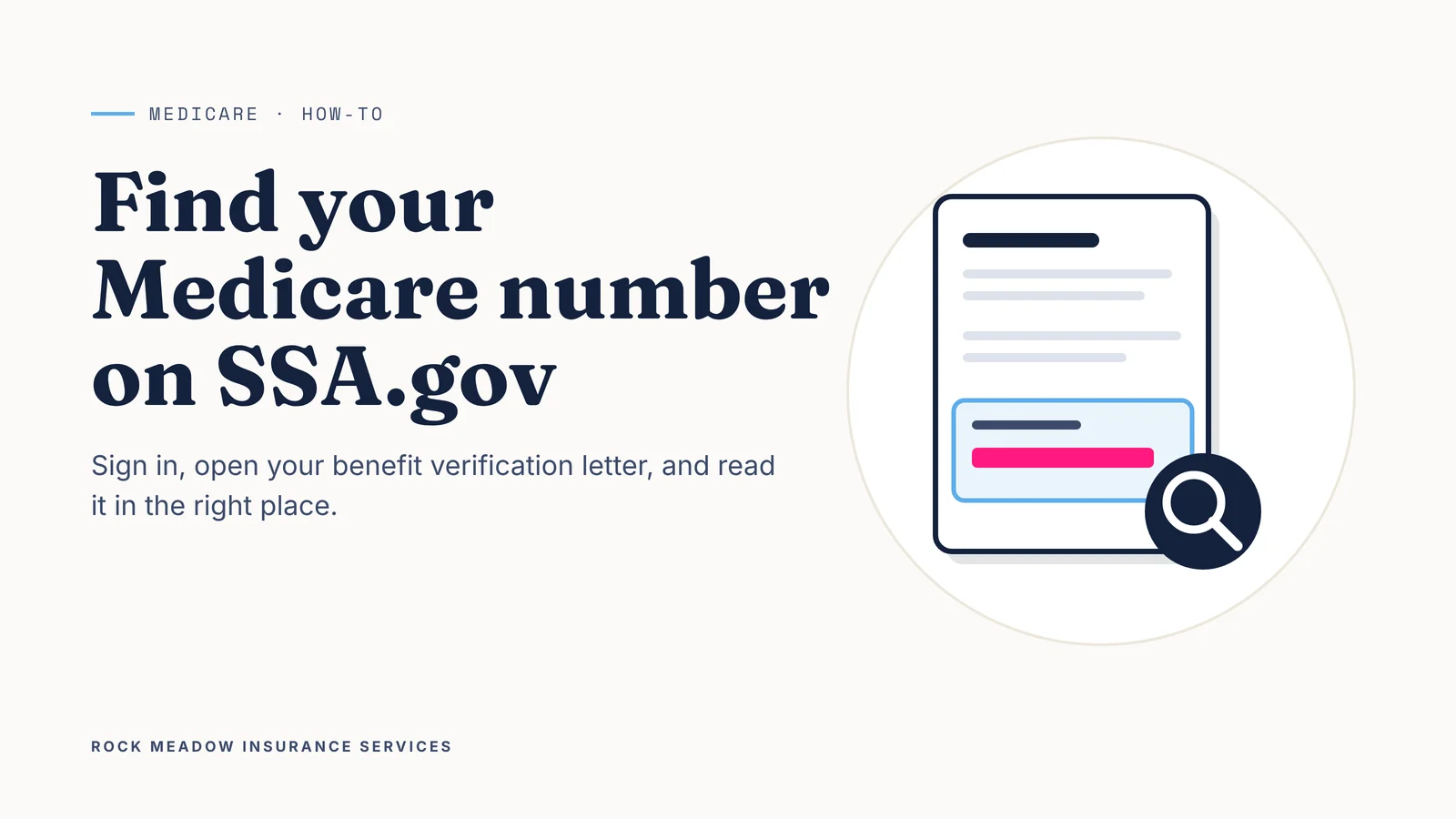
What this article covers: How to sign in to Social Security online, where to find your benefit verification letter, how to read the Medicare section of the letter, and what to do if you can’t sign in.
Why you’d need your Medicare number
Your Medicare number, also called the Medicare Beneficiary Identifier (MBI), is the 11-character ID on your red, white and blue Medicare card. It’s made of numbers and capital letters, and it’s not your Social Security number.
You’ll be asked for it when you enroll in a Medicare Advantage or Part D plan, switch plans during open enrollment, or fill out a Medicare Supplement application. If the card is lost or in a drawer somewhere, Social Security’s benefit verification letter is one way to find the number online. The same letter also works as proof that you have Medicare.
Before you start
- A computer, tablet or phone with internet access. A larger screen makes the PDF letter easier to read.
- A Login.gov or ID.me account. To create a Login.gov account, you’ll need an email address, a phone number and a government-issued photo ID.
- A few minutes. Setting up a new account takes longer than signing in to one you already have.
Old Social Security usernames and passwords no longer work. Since June 7, 2025, Login.gov and ID.me are the only ways to sign in.
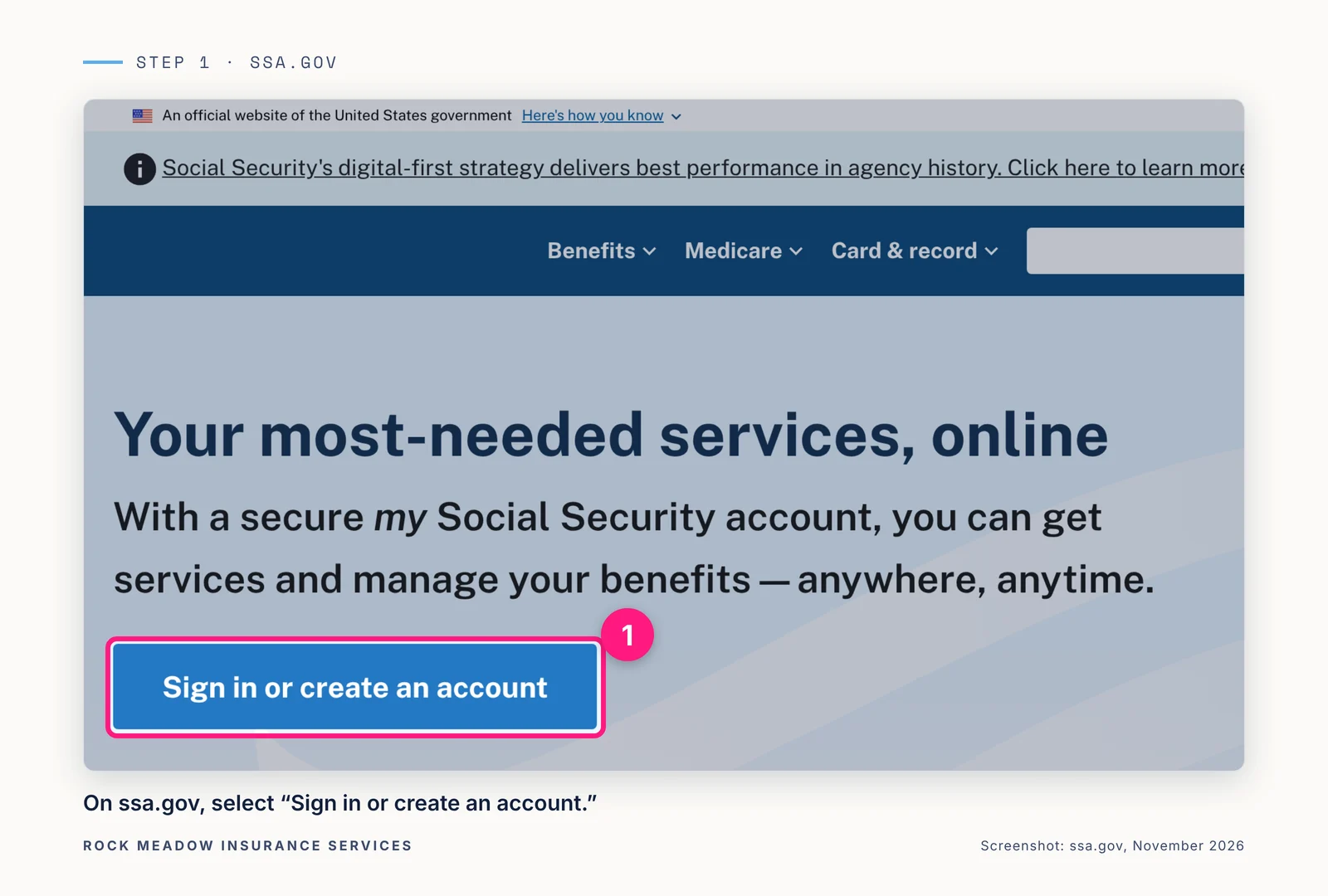
Step 1: Go to ssa.gov and select “Sign in or create an account”
Type ssa.gov into your browser. Check that the address ends in .gov before you sign in. On the home page, select Sign in or create an account.
Step 2: Sign in with Login.gov or ID.me
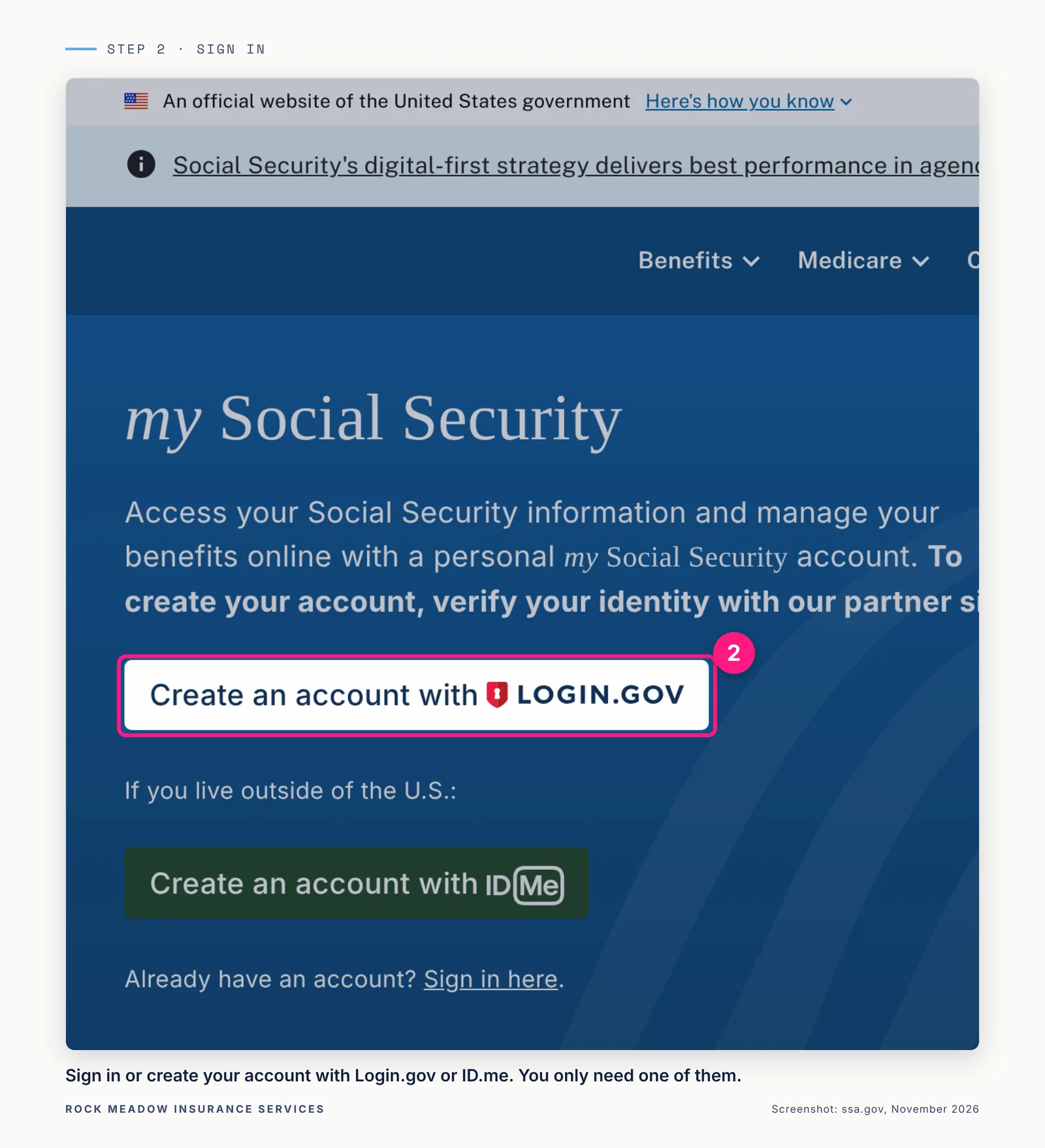
Choose Login.gov or ID.me. You only need an account with one of them. If you already have one, use it to sign in. If not, follow the prompts to create one.
You’ll confirm it’s you with a security code or another method you choose. This extra check protects your account.
Step 3: Open your benefit verification letter
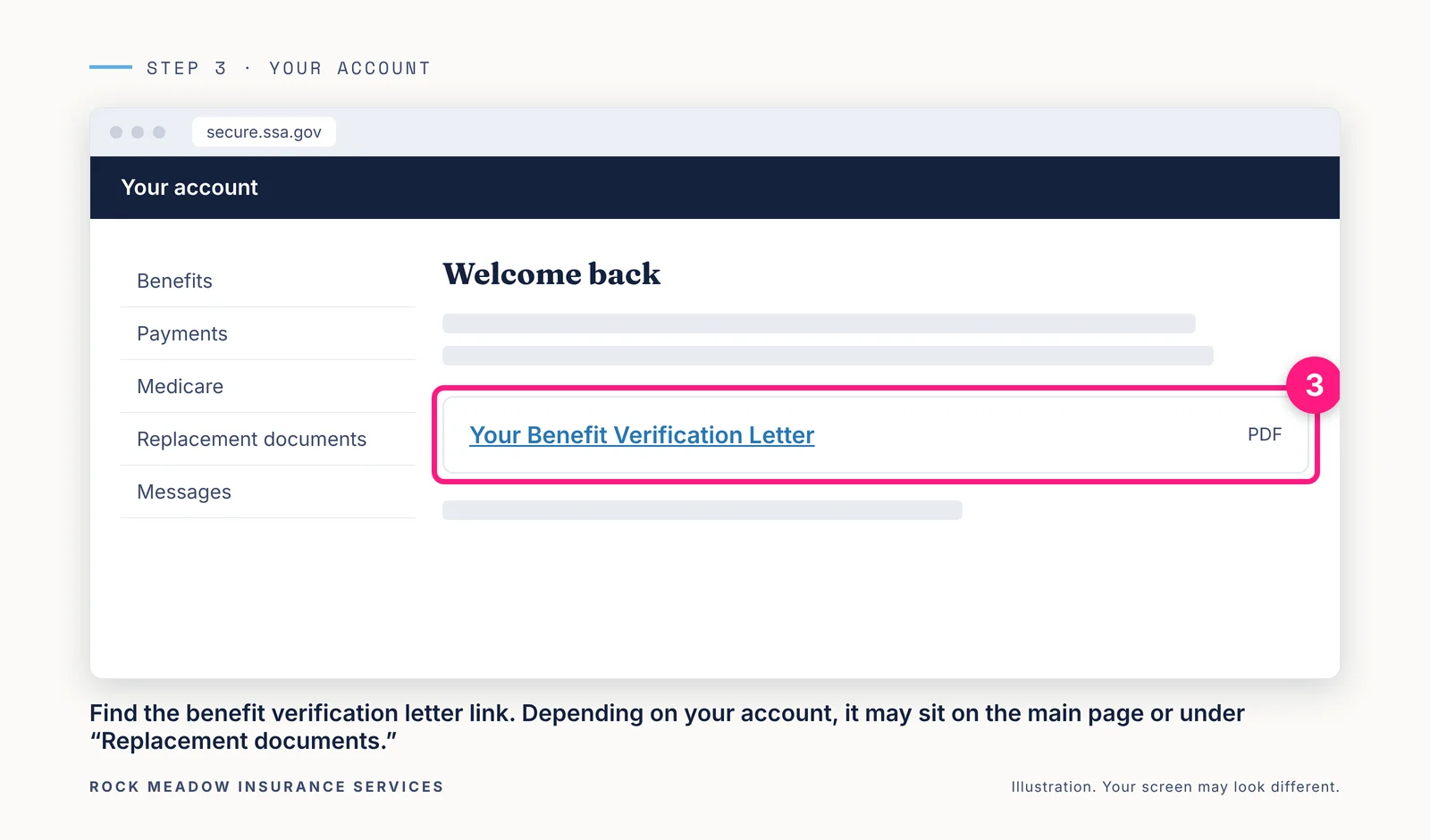
After you sign in, you’ll see your account’s main page. The layout looks a little different for someone who gets Social Security and Medicare than for someone who has Medicare only.
Look for the link to your Benefit Verification Letter on the main page. If you don’t see it there, it may be listed under Replacement documents.
Step 4: View, save or print the letter
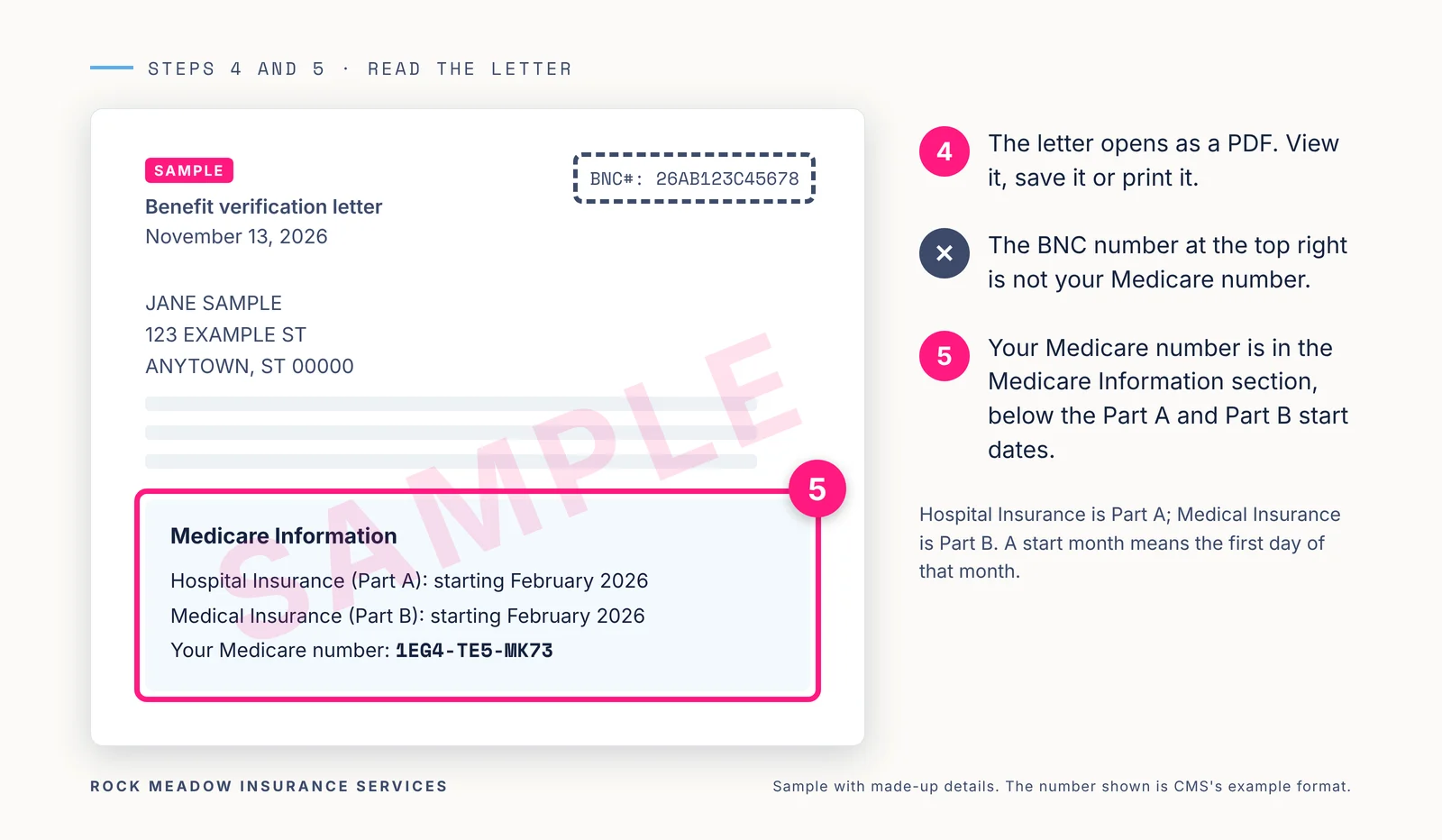
The letter opens as a PDF right away, so you can view it, save it or print it. Save a copy somewhere you can find it next time.
At the top right of the letter you’ll see a BNC number. That’s a reference number for the letter itself. It is not your Medicare number.
Step 5: Find your Medicare number on the letter
Scroll down to the Medicare Information section.
- Hospital Insurance is Medicare Part A.
- Medical Insurance is Medicare Part B.
- Start dates are always the first of the month listed. “February 2026” means February 1, 2026.
- Your Medicare number is listed just below the start dates.
If you can’t sign in
- Ask for the letter by phone. Call Social Security at 1-800-772-1213 (TTY 1-800-325-0778). The automated line is open 24 hours a day. When it asks how it can help, say “proof of income”. To talk with a person, call Monday through Friday, 8 a.m. to 7 p.m. local time. If you get benefits, Social Security mails the letter within 10 business days to the address it has on file.
- Need a new card instead? Once you’re signed in, go to Replacement documents and select Mail my replacement Medicare card. The card arrives in about 30 days. You can also call Social Security at the number above.
- Helping a spouse or parent? You can’t get the letter online for another person unless you’re their active representative payee. They can sign in with you beside them, or call Social Security themselves.
Keep your Medicare number safe
Treat your Medicare number like a credit card number:
- Don’t give it to anyone who calls, emails or shows up at your door unless they’re a known contact.
- Medicare won’t call you out of the blue to ask for personal information.
- Share the letter only with people you trust.
Where we help
Comparing Medicare plans this open enrollment? Request a Medicare quote and have your Medicare number handy. It helps the enrollment step go smoothly. Our page on Medicare plans explains the options.
If your plan is with Rock Meadow and you get stuck on a step, contact our team. Prefer to talk? Call (760) 654-6760.
Sources
- Get benefit verification letter, Social Security Administration
- my Social Security account FAQs and help, Social Security Administration
- How can I get a benefit verification letter?, Social Security Administration
- Replacement Medicare card, Social Security Administration
- Medicare Beneficiary Identifiers (MBIs), Centers for Medicare & Medicaid Services
- Your Medicare card, Medicare.gov
Rock Meadow Insurance Services is not affiliated with the Social Security Administration or Medicare. Screens and menu names on ssa.gov can change; Social Security’s site is the final word on how to get your letter.